Skip to content

Fournisseur Téléphonie IP

Business VoIP — Cloud PBX for all of Canada

Cloud PBX, call queues with callback, IVR and a management portal — save up to 60 % with no on-site system to maintain.

What other cloud providers don’t have

Call-centre features — not just a cheaper plan

Price matters (up to 60 % in savings). What truly sets us apart : tools that most cloud VoIP providers simply don’t offer.

Rare in the cloud

Queue callback (press 1)

Callers keep their place, hang up, and the system calls them back when an agent is free — a true queue callback, not a voicemail.

Learn more
New

Web form → real queue

A link or iframe on your website: the customer enters the same phone queue — not an email, not a forgotten CRM record.

Learn more

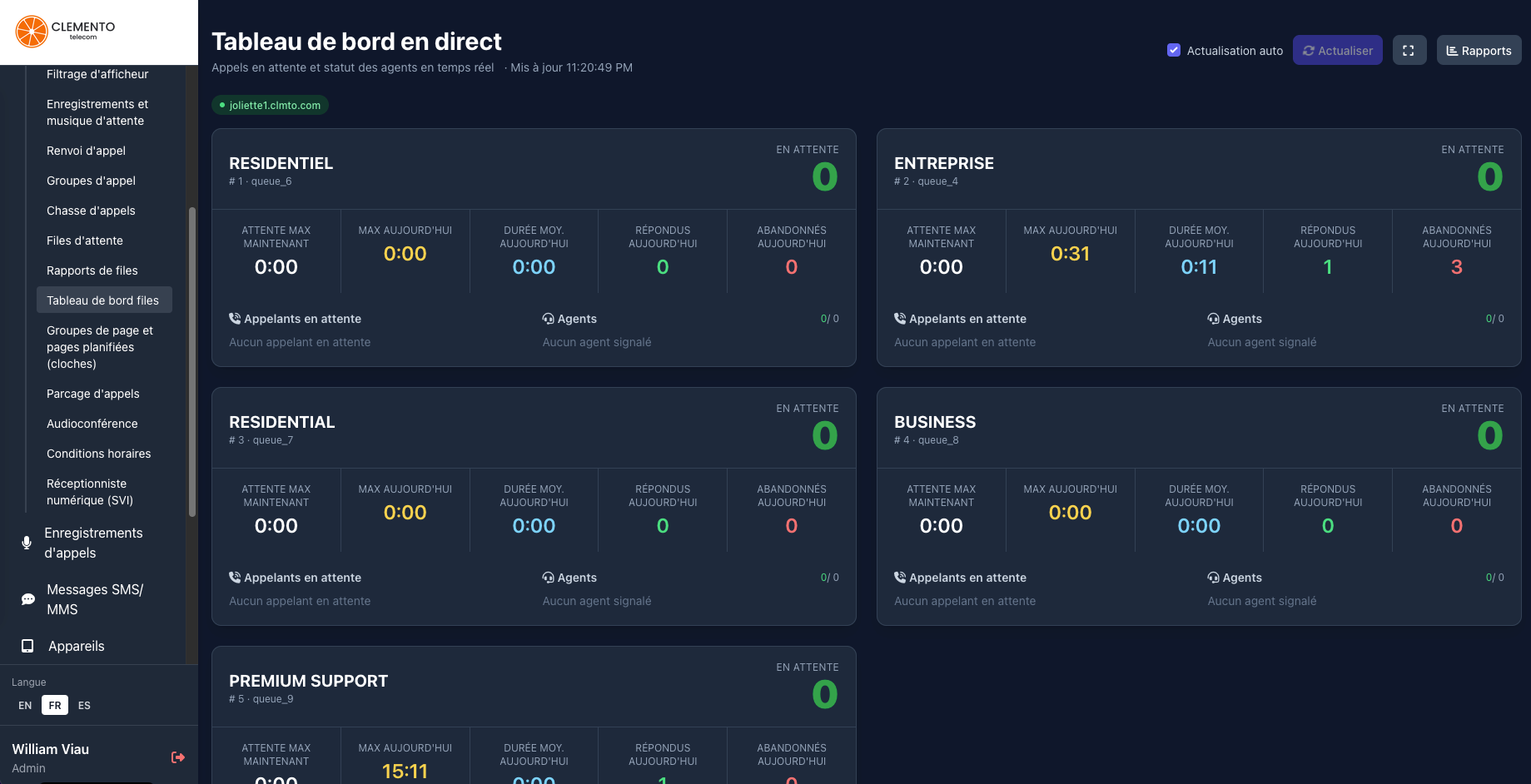
Wallboard & supervision

A live view of queues, callers (including callbacks) and agents — run your service like a real call centre.

Learn more

Truly trilingual

FR · EN · ES for callers (IVR, queues, voicemail) and for agents in the portal — not a partial translation.

Learn more

Scheduled pages & bells

Announcements and bells at fixed times (schools, factories, stores) or live paging to a group of phones.

Learn more

Competitive pricing, no sacrifice

Save up to 60 % vs traditional solutions — with the features above included in the Cloud PBX.

Learn more

Plus all the essentials : voicemail to email, call recording, IVR, ring groups, forwarding, parking, SMS/MMS, audio conferencing, time conditions, customer portal, and more.

Keep your devices — or buy new ones, preconfigured

No need to buy everything again. Plug in what you already have, or order hardware delivered ready to use.

Keep your phones

Universal SIP compatibility (Yealink, Poly, Cisco, Fanvil, softphones…). Enter the extension credentials — it just works.

New preconfigured devices

Order from us : phones arrive already configured. For Grandstream, automatic cloud provisioning through the portal.

See phones in our store Learn more about provisioning

Need help choosing?

Our VoIP experts are available to advise you for free, with no commitment.

833-947-1145
Monday-Friday: 10 a.m.-4 p.m. • Extension 1
Request a quote

Full PBX features

A turnkey professional IP phone system: routing, queues, voicemail, SMS, paging and a management portal — all included in your account. Also check out our Cloud PBX solution.

Digital receptionist (IVR)

Multi-level voice menus, custom announcements and intelligent routing based on the key pressed.

Learn more

Call queues

Ring strategies, hold music, position announcements and a callback option for callers.

NEW

Web callback form

A link or iframe on your website: visitors leave their name and number and enter the same queue as phone callbacks.

Learn more

Queue reports

Detailed statistics on volumes, wait times, abandons and agent performance.

Queue dashboard

Real-time wallboard: waiting callers, connected agents and queue status.

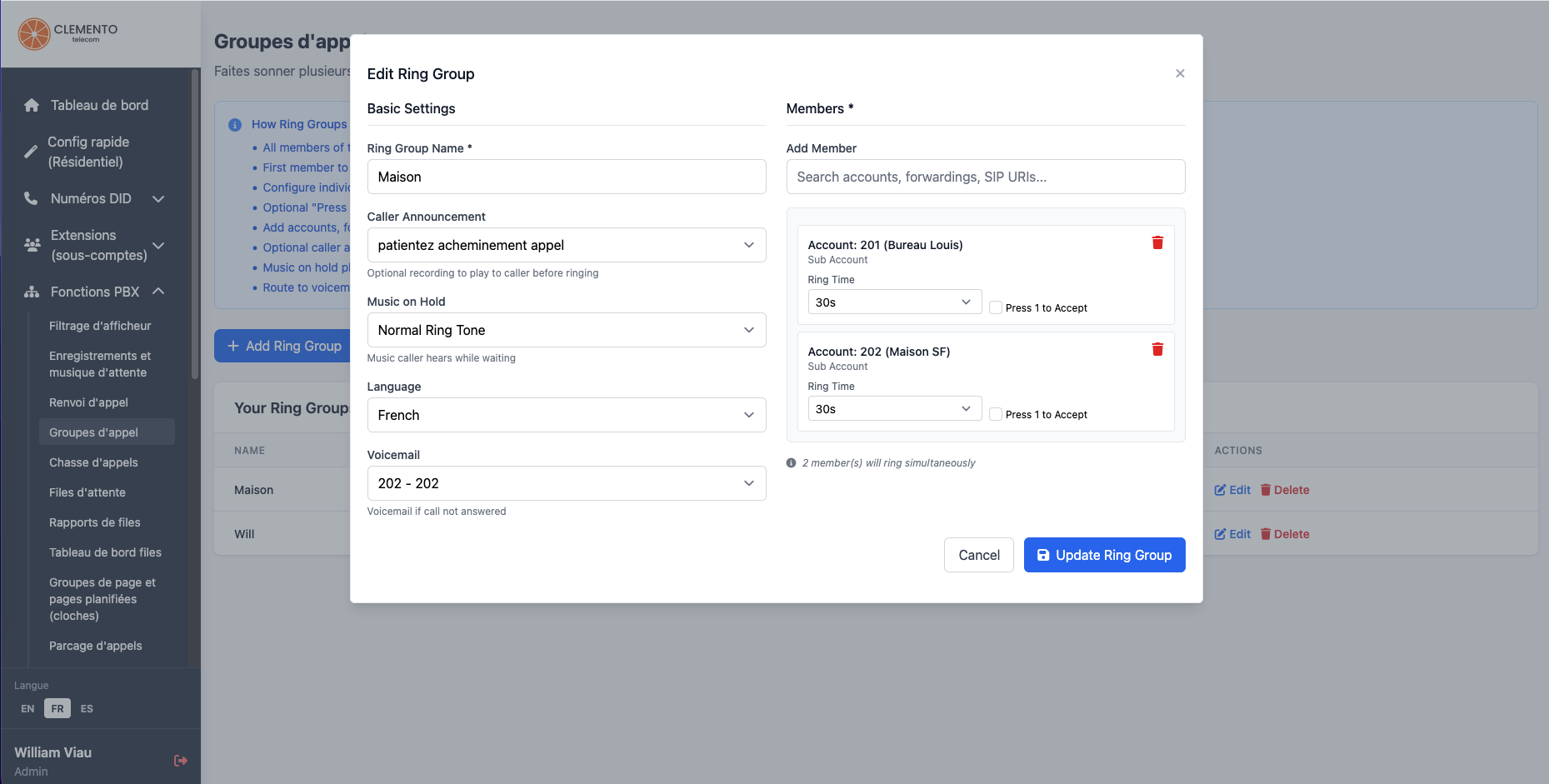
Ring groups

Ring multiple extensions at once or in sequence so you never miss a call.

Call hunting

Configurable ring sequences (cascade) until a member answers.

Call forwarding

Forward to another extension, a cell phone or an external number based on your rules.

Call parking

Put a call on shared hold and pick it up from any extension.

Time conditions

Business hours, statutory holidays and specific closed days — recurring every year or one-time dates.

Learn more

Voicemail

Voicemail boxes per user or department, accessible by phone (*97 / *98) or from the portal.

Voicemail to email

Receive your voice messages by email, with the audio file attached according to your preferences.

Voicemail transcription

Read the content of voice messages as text in your email or the portal — no need to listen to every message.

Call recording

Record inbound and outbound conversations, listen to them and archive them from the portal.

Recording transcription

Turn your call recordings into searchable text for follow-up, training or compliance.

Recordings & hold music

Announcement library (upload, microphone or text-to-speech) for IVR, queues and hold music.

Caller ID filtering

Block, prioritize or route by number: for example, send your VIP customers straight to an agent or a priority queue.

Audio conferencing

Audio conference rooms with access codes for team and client meetings.

Scheduled pages & bells

School bells, breaks and announcements at fixed times — or live paging to a group of phones.

Local & toll-free numbers

Order Canadian DIDs and 1-800 numbers, manage inbound routing per number.

Number portability

Keep your existing numbers: request the transfer (LNP) directly from the portal.

Extensions & devices

Create and manage user accounts (SIP), passwords, caller ID and per-extension options.

Concurrent Registration

No need for extension 201 at the office and 202 on your cell: both can ring on 201. Or two separate extensions, whichever you prefer.

SMS / MMS

Send and receive business text messages from your numbers, with history in the portal.

NEW

GoHighLevel integration

Automatic notes in GHL conversations: calls, recordings, voicemail and SMS/MMS.

Learn more

Emergency services (E911)

Configurable emergency addresses for each number to meet Canadian requirements.

Devices from any brand

Universal SIP compatibility — plus automatic cloud provisioning for Grandstream phones.

Mobile app & softphone

Make and receive your business calls on a smartphone or computer, wherever you are.

Customer portal

Configure everything online: call history, billing, balances and support — no on-site technician needed.

Multi-server

Multiple points of presence: your phones don’t all have to register on the same server.

Truly trilingual

FR · EN · ES for callers (IVR, queues, voicemail) and for agents in the PBX portal.

Business quote

Get a callback for your quote

Evaluating a VoIP solution for your business ? Leave your contact details : a sales advisor will call you back quickly with a quote tailored to your needs.

  • 1 Briefly describe your situation
  • 2 We call you back shortly
  • 3 Receive a clear quote, no commitment

See all the features that are only available with us

Rare cloud advantage

Call queues with callback : press 1, hang up, keep your place

Most cloud VoIP providers offer classic call queues — music, position, agents picking up. Almost none offer a true automatic queue callback : the caller keeps their place in the queue without staying on the line, and the system calls them back when an agent is free.

With us, it's built into the PBX : enable the option on a queue, and your customers hear "To keep your place and receive a callback, press 1" — in French, English or Spanish depending on the queue's language.

1

On hold

The caller reaches your queue and hears the hold music and position announcements as usual.

2

Presses 1

They confirm the callback and hang up — no more holding the phone for 10, 20 or 40 minutes.

3

Keeps their place

A system placeholder keeps their FIFO position in the same queue. They are not sent to the back of the line.

4

We call them back

As soon as an agent is available for their position, the system dials their number and connects the call.

Fewer abandoned calls, a better customer experience

Your callers no longer have to stay on the line indefinitely. They keep their place, you keep control (max delay, email alert if a callback expires without an agent), and your agents pick up conversations that are already "warm".

  • Offered in FR / EN / ES — based on the queue's language, with system messages or custom recordings.
  • Place preserved — the callback does not send the caller to the back of the queue.
  • Expiry alerts — receive an email if a callback request expires without reaching an agent.
New Same queue as the *1 callback

Web callback form : your website puts the customer in the queue

In addition to "press 1" over the phone, each queue can publish a public link or an iframe on your website. The visitor enters their name and number : the request goes into the same queue as phone callbacks. When an agent is free, the system calls them back automatically.

Perfect for a "Contact us" page, a product page or a campaign : the customer doesn't wait on the line, and your team handles the request like a caller already in the queue.

1

You enable the link

On a queue, enable the web form, choose the caller ID DID, then copy the URL or the iframe snippet.

2

The customer asks

On your site, they enter their name and number (captcha-protected) — without waiting on hold.

3

They enter the queue

The request joins the queue (back of the line), with the same pipeline as the *1 callback : agents, music, supervision.

4

We call them back

As soon as an agent is available, the system dials their number — just like a callback requested by phone.

  • Link or iframe — embed the form on your website in seconds.
  • Same queue, same agents — not a separate web silo : wallboard, reports and outbound callback unchanged.
  • Independent from *1 — enable web, phone, or both per queue.
Learn more
Real-time supervision

Call queue supervision tools

Run your call centre with true supervision tools : live wallboard, agent status, waiting callers (including callbacks) and detailed reports — all in the portal, no third-party software.

Your supervisors see what's happening right now, and your managers analyze performance over the period that matters.

Live wallboard

Queues, waiting callers, callbacks and agents — auto-refresh for the team on a wall or a screen.

Agent status

Dynamic log in / log out (*11 / *12), including all queues at once — ideal for shift work.

Reports & stats

Volumes, wait times, abandons and agent performance to improve service week after week.

The whole distribution engine, under control

Beyond the supervision screen, you configure call-centre-grade queues from the portal — no technician needed for every change.

  • Ring strategies — round-robin, fewest calls, ring all, and more.
  • Music & announcements — position, estimated wait time, custom messages in FR / EN / ES.
  • Failover & fallback — timeout destinations, full queue, and overflow paths.
  • Visible callbacks — callback requests also appear on the wallboard alongside live callers.
Live call queue wallboard in the portal — waiting callers and agent status

Live wallboard: queues, waiting callers (including callbacks) and agents — auto-refreshing in the portal.

Open · Closed · Holidays

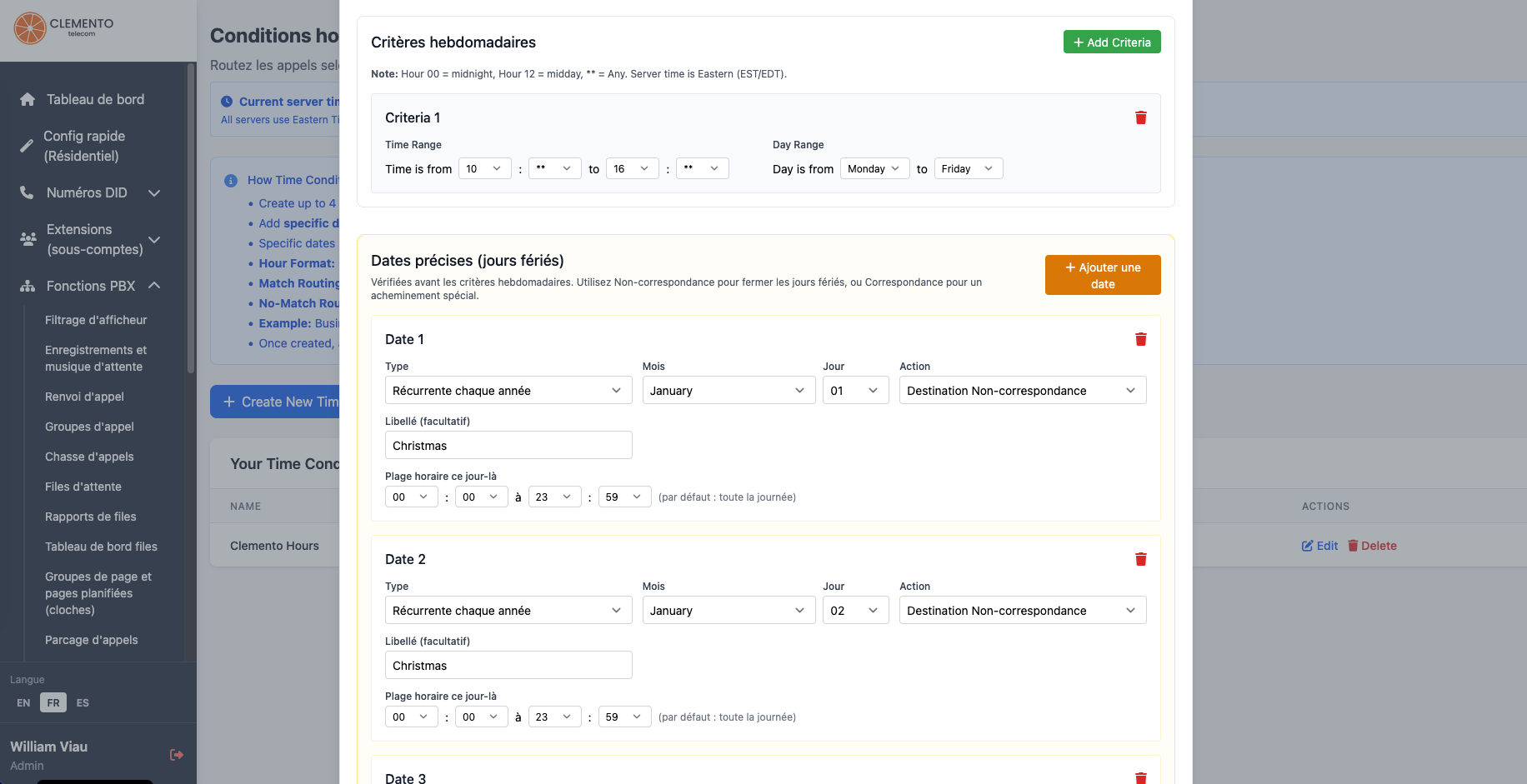
Time conditions: business hours, holidays and specific closures or openings

Route your calls automatically based on the time — daytime to reception or a queue, evenings and weekends to voicemail or a cell phone. Best of all: you also manage statutory holidays and custom closed days, without letting the phone ring into the void.

Schedule a closure that recurs every year (e.g. December 25) or a single specific date (e.g. inventory closure on March 14, 2026). Specific dates are checked before the weekly schedule.

Weekly schedule

Mon–Fri 9 a.m.–5 p.m., evenings, weekends — each time slot can route to a different destination.

Recurring holidays

Christmas, New Year's Day, Canada Day… once configured, they repeat every year without touching them again.

Specific date (one-time)

Close on a single day — a move, training, inventory — with an exact calendar date.

Actually close on the right days

Many cloud systems only handle "open / closed" for the week. Here, you add calendar exceptions so December 24 or an unexpected day off goes straight to voicemail — even if it falls on a "normally open" Tuesday.

  • Recurring every year — month + day (e.g. 12/25), perfect for fixed holidays.
  • One-time date — a specific calendar day, without affecting future years.
  • Open or closed that day — force the "match" or "no-match" destination (e.g. voicemail).
  • Optional time range — close all day, or only part of it (closed in the morning, open in the afternoon).
Time conditions configuration in the portal — weekly criteria and holidays

In the portal: Mon–Fri time slots, recurring holidays and specific dates (closed… or exceptionally open).

Learn more about IVR and time conditions

Schools · Factories · Offices

Scheduled pages and bells: ring, play a message, or speak live to a whole floor, certain extensions, or the entire building

No more separate bell system or technician needed to change the schedule. Create paging groups (your IP phones or speakers), choose a recording — school bell, break tone, announcement — and schedule the days and time. The PBX calls the group and plays the sound automatically.

You can also page live: dial the group's extension from an internal phone, speak, and all members auto-answer.

1

Paging group

Select the extensions (classrooms, workshop, reception…) that should ring together.

2

Recording

Upload a bell, a break tone or an announcement — or generate it with text-to-speech in the portal.

3

Schedule

Choose the time (Toronto time zone), the days of the week, and auto-answer or ring mode.

4

It rings

At the scheduled time, the system pages the group and plays the recording — test it in one click from the portal.
Two ways to page

Whether it's an automatic bell every morning or an urgent announcement right now, the same group of phones serves both purposes.

Scheduled pages (bells)

Recurring schedules: class start, recess, end of shift, a "store closes in 15 minutes" reminder. Enable or disable a schedule without rebuilding everything.

Live page

Assign a dialing extension to the group (e.g. 860). An employee dials that code, the phones answer automatically, and they speak to everyone at once.

  • Auto-answer — ideal for bells (Call-Info); a "ring first" mode is also available.
  • Any days you choose — Monday–Friday for schools, weekend shifts, or a single day for an event.
  • Instant test — launch a page right now to validate the sound and phones before the real schedule.

Real-world use cases

A single PBX often replaces a dedicated bell system — with the flexibility to change the schedule online in two minutes.

Schools and training centres

Start/end-of-period bells, recess, general announcements in all equipped rooms.

Factories and warehouses

Break tones, shift changes, audio alerts on workshop phones without running around.

Stores and offices

"Store closing soon" announcements, team huddles, or an urgent page to reception and every floor.

Open hardware · Zero lock-in

Compatible with all brands — automatic provisioning for Grandstream

Our PBX speaks standard SIP. You don't have to buy our phones or replace your fleet: Yealink, Poly, Cisco, Fanvil, softphones (Zoiper, Linphone, mobile apps) and most SIP-certified devices connect with your extension credentials.

And if you choose Grandstream, we go further: an automatic cloud provisioning tool built into the portal. Add the device, assign the extension — the phone configures itself.
Need to connect your PBX to the public network? Check out our SIP Trunk offering.

Yealink

Manual SIP / guide

Poly / Polycom

Manual SIP / guide

Cisco · Fanvil · others

Any SIP device

Grandstream

Auto provisioning

All brands, truly

No "exclusive phones" and no fees to use the hardware you already own. Each user gets a SIP account in the portal; enter it once on the device — or use our configuration guide.

  • SIP desk phones — every brand compatible with an external SIP server.
  • Softphones & mobile — work from a computer or cell phone with the same extensions.
  • Concurrent Registration — instead of extension 201 at the office and 202 on your cell, both devices can be on 201 (up to 3 in parallel). You can also keep two separate extensions if you prefer.
  • Guide in the portal — recommended settings (server, ports, security) to connect any device.
  • No hardware lock-in — switch brands tomorrow without switching VoIP providers.

Grandstream automatic provisioning

For Grandstream phones, we developed our own cloud tool: no more opening each device's web interface one by one.

1

Add the device

Enter the MAC address and serial number in the portal (Devices section).

2

Assign the extension

Link the phone to the employee's extension — SIP credentials pushed automatically.

3

Plug in and it's ready

The phone fetches its configuration from the cloud. Multi-site deployment without an on-site technician.

Ideal for fleets. Open a new office, receive a box of Grandstream phones, add the MACs in the portal — the extensions register on your PBX by themselves.

Business phones

Everything for your business

A professional selection of desk phones : easy connectivity, superior audio quality and quick setup — delivered preconfigured for your PBX.

See all products
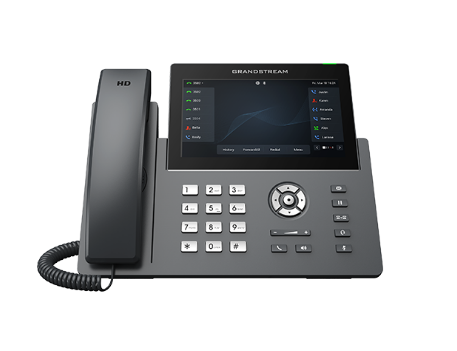
View Grandstream GRP2670
-35%
Grandstream GRP2670

Grandstream GRP2670

GRP2670 Wi-Fi 802.11ac SIP VoIP phone, 12 lines, 6 SIP accounts, touch screen.

MSRP: 274.42$
178.37$
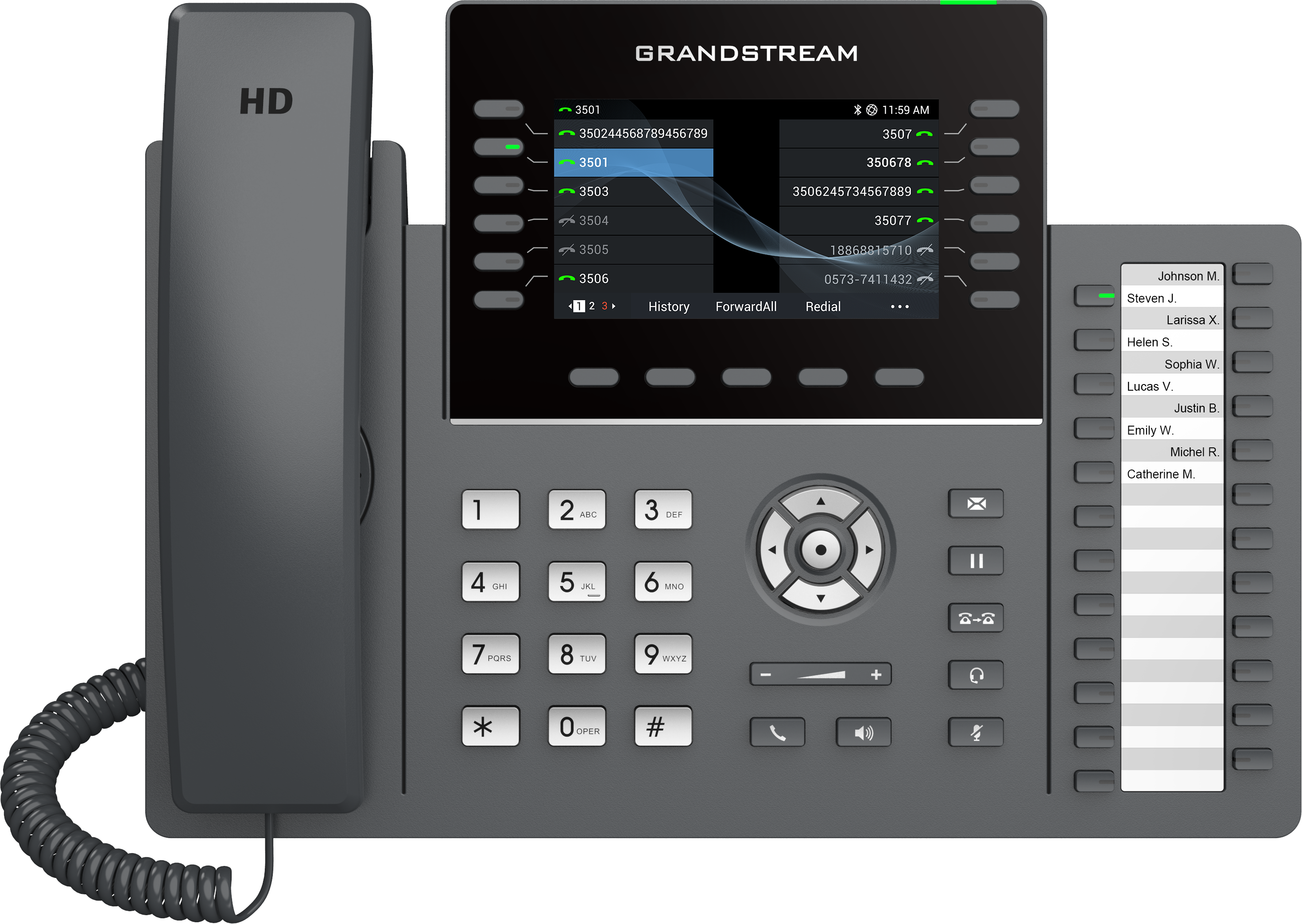
View Grandstream GRP2636
-35%
Grandstream GRP2636

Grandstream GRP2636

GRP2636 Wi-Fi 802.11ac SIP VoIP phone, 12 lines, 6 SIP accounts.

MSRP: 220.64$
143.42$
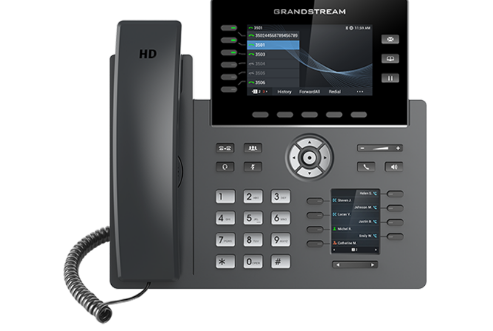
View Grandstream GRP2616
-35%
Grandstream GRP2616

Grandstream GRP2616

GRP2616 Wi-Fi 802.11ac SIP VoIP phone, 2 x Gigabit Ethernet, 6 lines.

MSRP: 260.63$
169.41$
Multi-POP infrastructure

Multi-server: your phones don't all have to be on the same server

Our platform runs on multiple interconnected VoIP servers (POPs). One extension in Montréal, another in Québec City or working from home — each can register on the closest or most convenient server. They stay in the same PBX: same queues, same ring groups, same feature codes.

No need to force the whole company onto a single registration point. When a call needs to reach a colleague registered elsewhere, the system connects from one server to another, transparently.

Multiple points of presence

The infrastructure is distributed: less latency depending on the region, and better resilience than a single central server.

Register anywhere

Each phone or softphone registers on a SIP server — no requirement that the whole fleet point to the same hostname.

One logical PBX

Extensions, queues, parking, pickup and transfers follow your extensions even when they aren't on the same server.

Why it's a game changer

With many "cloud" providers, all devices must stick to the same entry point. With us, the network is multi-server from the start: ideal for multi-site businesses, hybrid teams and deployments that grow without reconfiguring everything.

  • Natural multi-site — office A and office B on different servers, same internal dial plan.
  • Remote work without constraints — a softphone can register somewhere other than the head office phones.
  • Inter-server calls — ringing, transfers and PBX features keep working from one POP to another.
  • Better proximity — attach devices to the server that offers the best network path for you.

A concrete example

Your reception and head-office extensions register on one server. The regional warehouse and three remote employees register on another. An inbound call to a queue or ring group reaches everyone — no matter where each phone is registered.

Server A — head office

Reception, sales, desk phones connected to the head office's local network.

Server B — other site / remote

Warehouse, branch office or softphones at home, with no mandatory VPN to the head office.

Same company

Same portal, same extensions, same queues and same routing rules — one PBX, multiple servers.

Français · English · Español

Truly trilingual — for your callers and for your agents

It's not just a French home page. The PBX speaks French, English and Spanish end to end: what the caller hears on the phone, and what your teams see in the portal to manage the system.

Ideal anywhere in Canada: one queue in French, another in English, a voicemail in Spanish — without cobbling together three different platforms.

FR

Français

Portail, invites système, SVI, files et messagerie

EN

English

Same experience for English-speaking callers and staff

ES

Español

Misma cobertura para clientes y agentes hispanohablantes

Customer side (inbound calls)

Every element of the call journey can speak your customer's language — not just a greeting recorded once.

  • IVR / receptionist — menus and system prompts in the language chosen for the IVR.
  • Call queues — position, patience prompts, the "press 1" callback offer in the queue's language.
  • Voicemail, groups, conferencing, parking — system prompts aligned with the configured language.
  • Per queue or department — one queue in FR, one in EN, one in ES for your markets, no forced mixing.

Agent side (PBX portal)

Your employees aren't stuck with an English-only interface. Everyone can use the portal in their own language — to configure, check history or train a new hire.

FR / EN / ES interface

Language preference in account settings: menus, labels and portal pages follow suit.

Same power, three languages

Queues, IVR, DIDs, devices, schedules — all PBX management stays accessible, not just the marketing home page.

Mixed teams

A supervisor in French, one agent in English, another in Spanish — each in their own language, same company account.

Customer portal

Manage your phone system from a single portal

Extensions, IVR, ring groups, history, queues, schedules and billing — everything is configured online, in French, English or Spanish. Here's what it looks like.

CLEMENTO telecom customer portal login
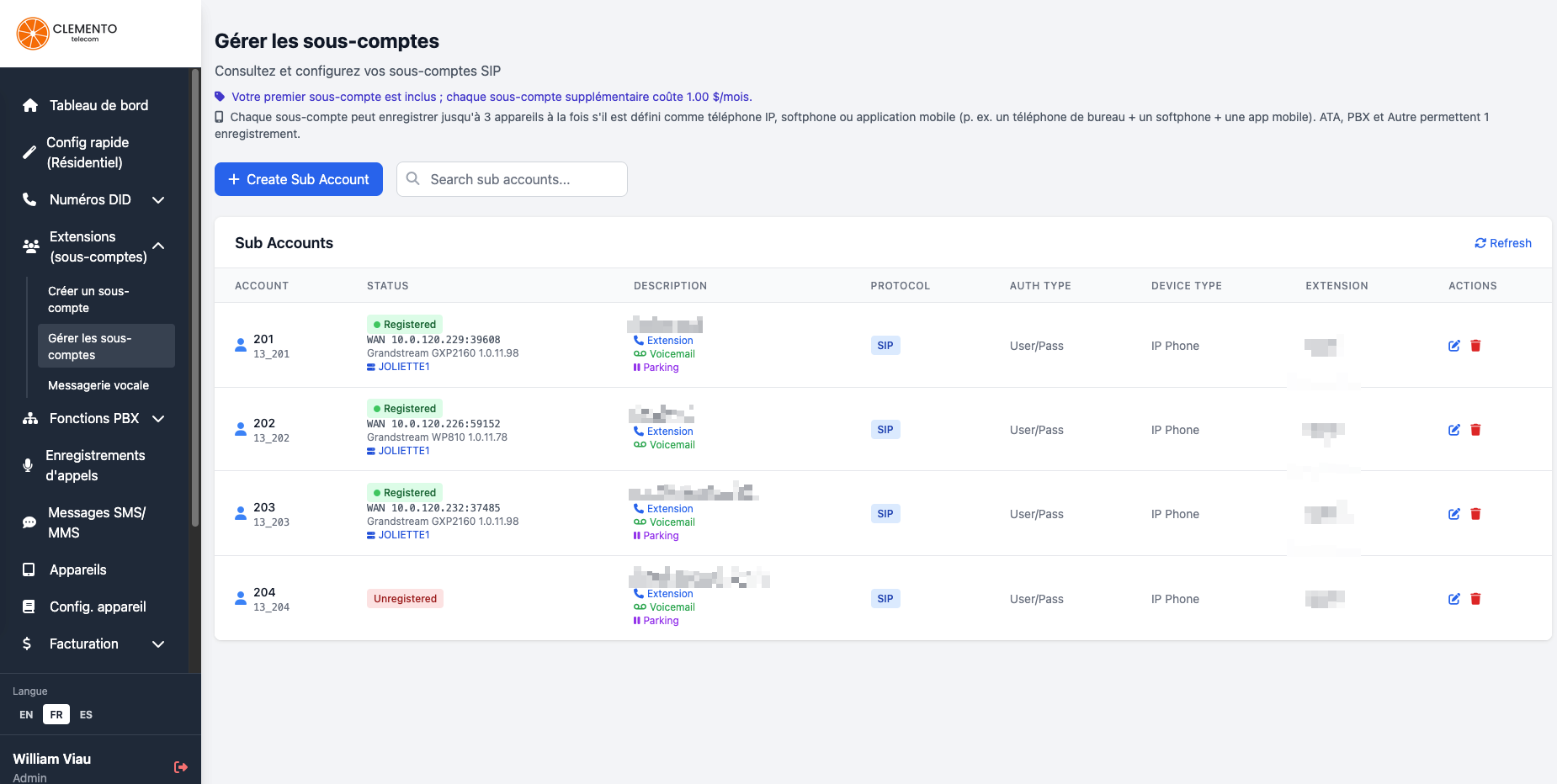
Managing extensions and SIP sub-accounts in the portal

Extensions & Concurrent Registration

Create your extensions, see who is registered, and use up to 3 devices on the same extension (e.g. 201 at the office and on your cell) — or two separate extensions if you prefer.

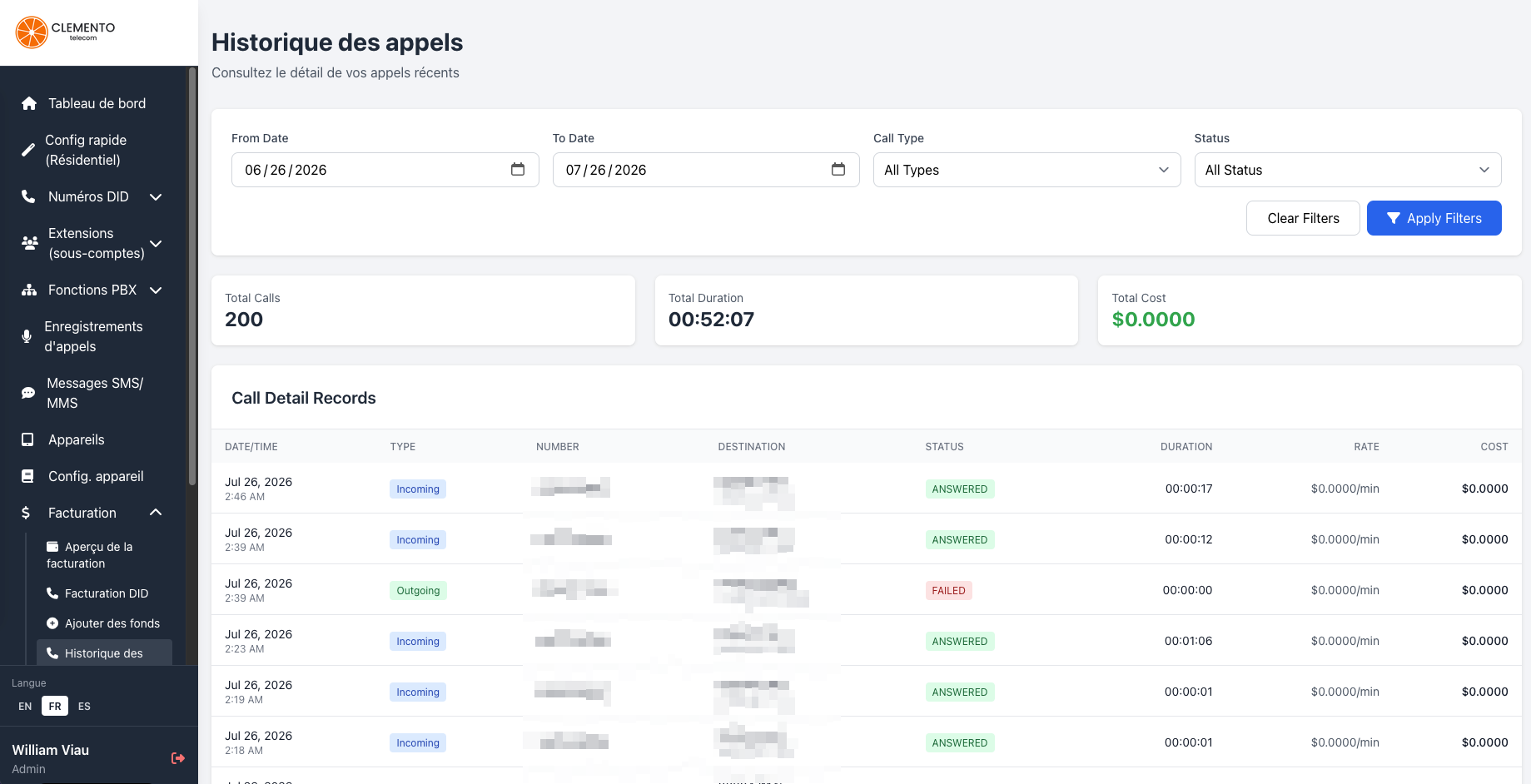
Call history in the customer portal

Call history

Review inbound and outbound calls, durations, statuses and costs — with filters by date and call type.

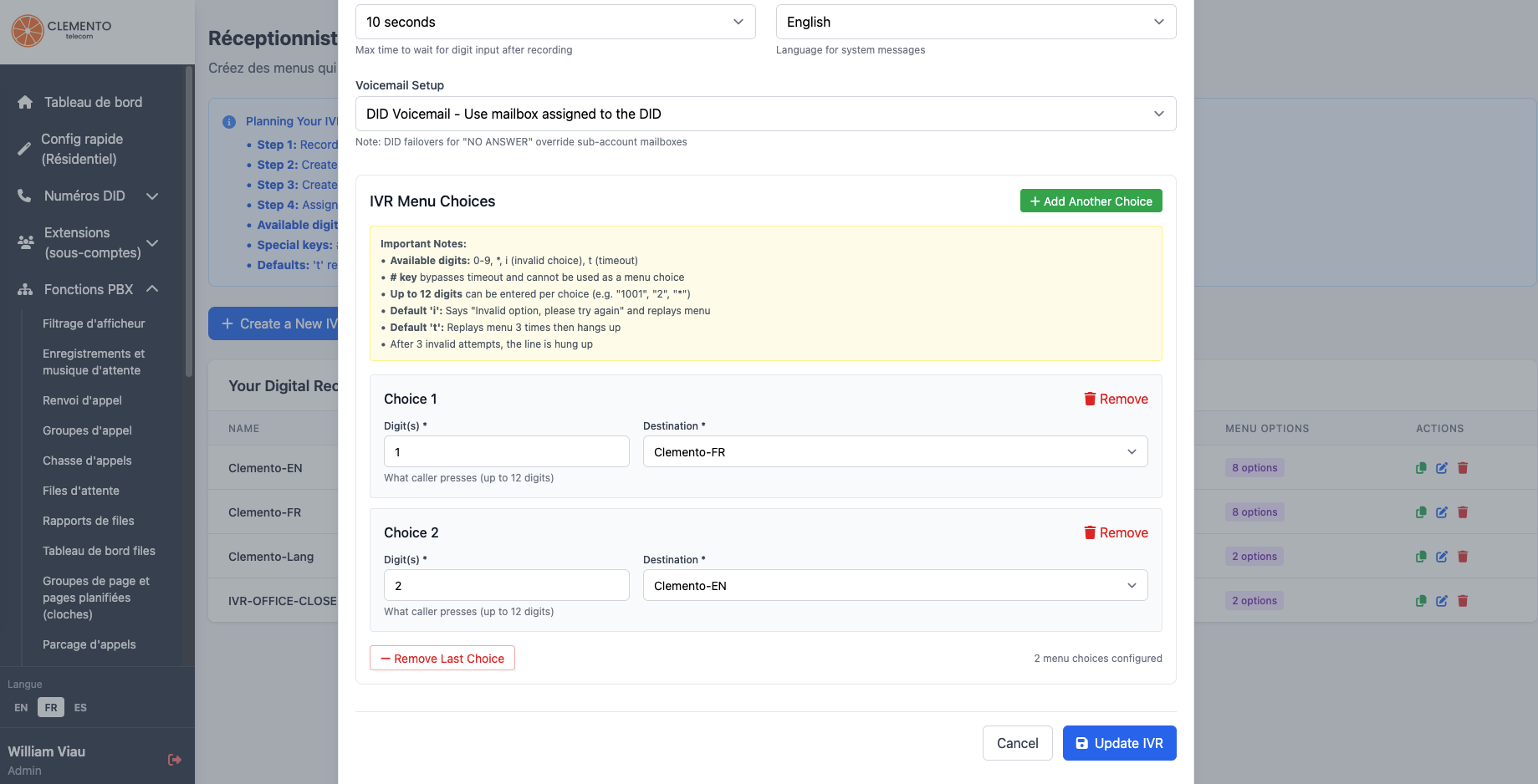
Digital receptionist (IVR) configuration in the portal

Digital receptionist (IVR)

Multi-level menus: "press 1 for French, 2 for English" — each key leads to a queue, a group or a voicemail box.

Ring group configuration in the portal

Ring groups

Several extensions ring at the same time — ideal for reception, sales or home + office.

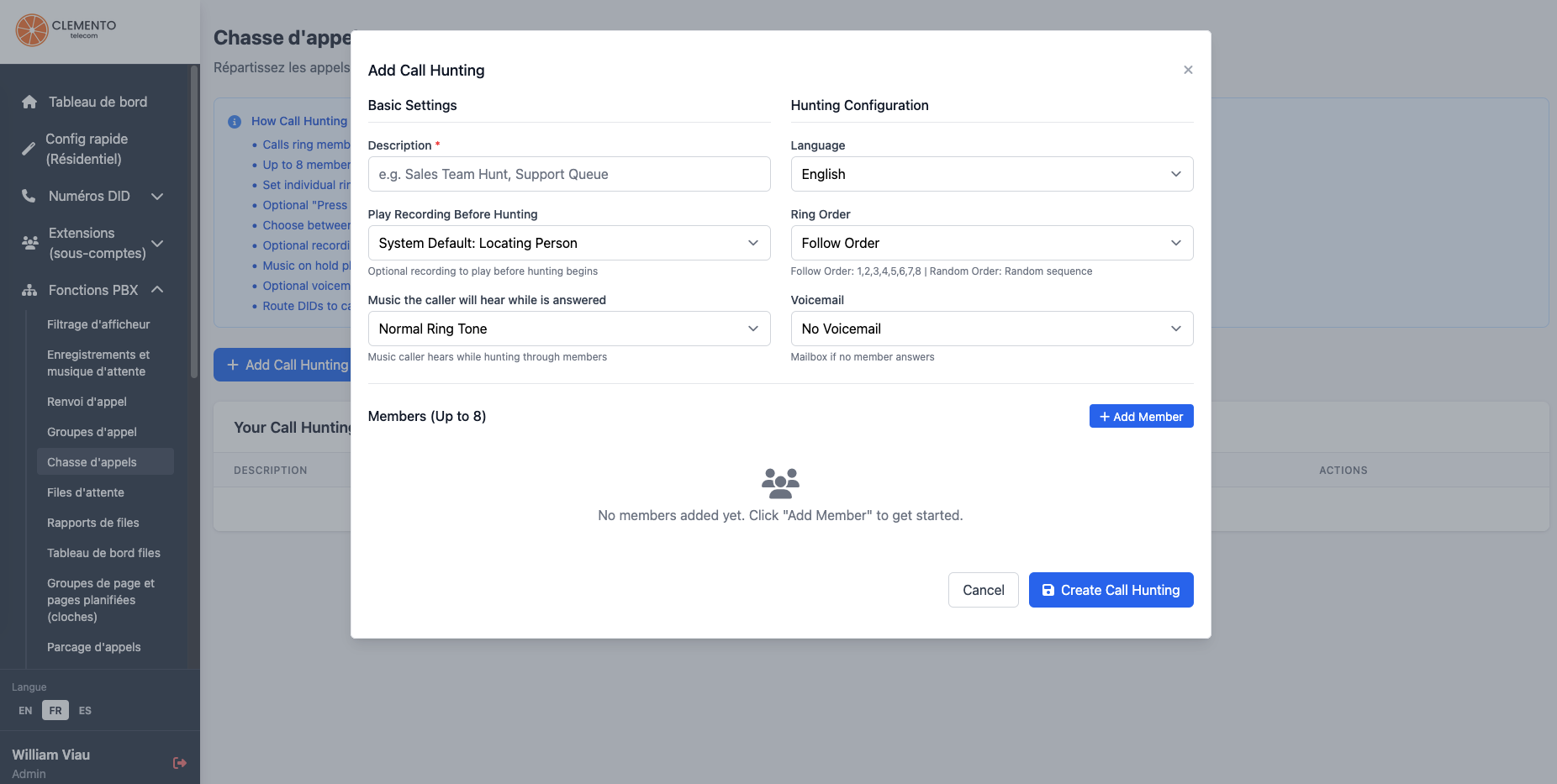
Call hunting configuration in the portal

Call hunting

Cascading ring (in order or random) until a member answers — up to 8 members per hunt group.

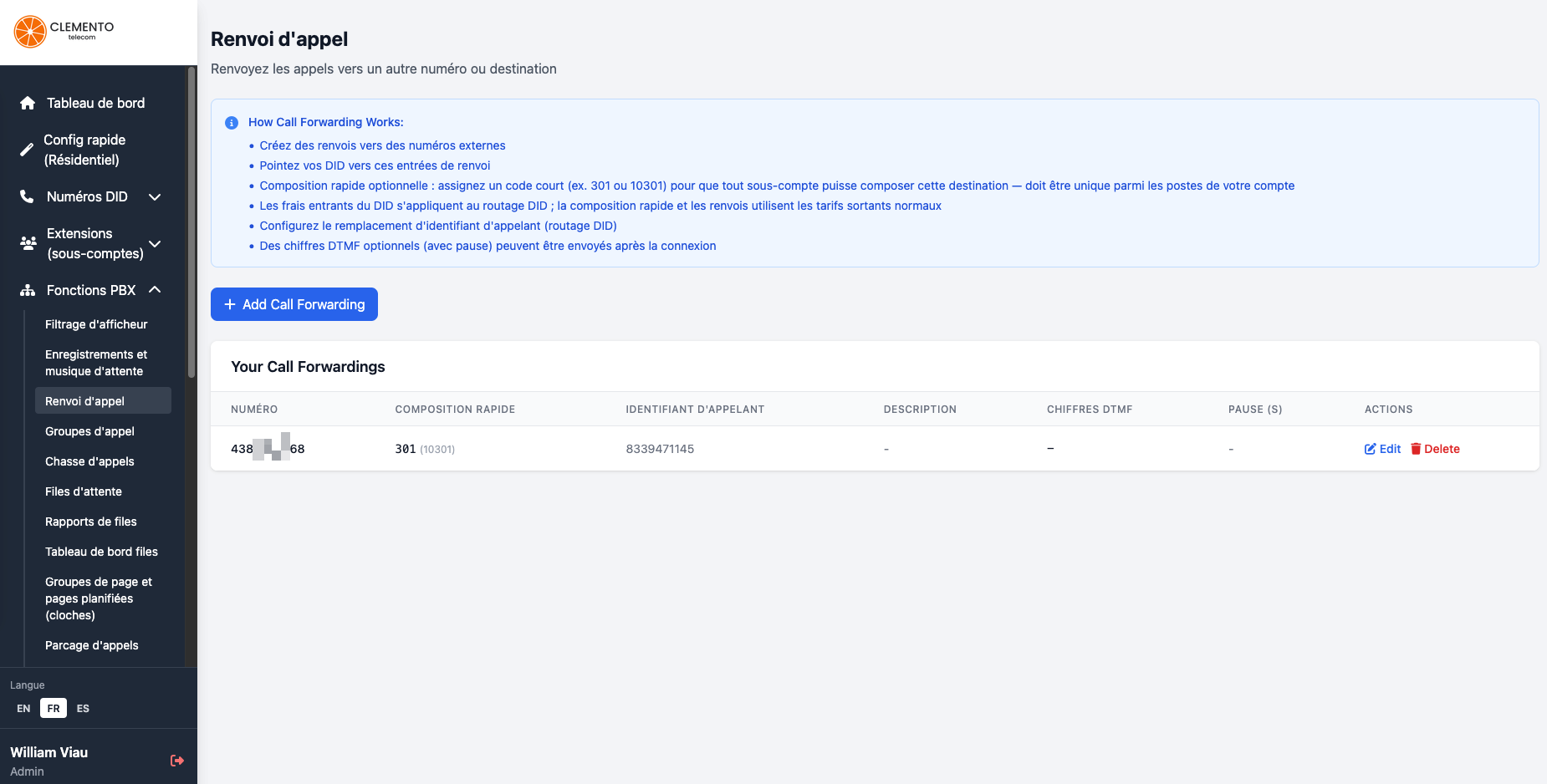
Call forwarding management in the portal

Call forwarding

Forward to a cell phone or an external number, with optional speed dial and custom caller ID.

Our Transparent Pricing Model

Pay only for what you need with our clear, no-surprise à-la-carte pricing.

Monthly Rates

Local numbers

Numbers with a local area code

$1.50*/number

Toll-free numbers

800/888/877/etc. numbers

$2.50*/number

Users

Per employee/user

$1.00*/user

Simultaneous inbound lines

Concurrent call capacity (Recommended: 1 line per 4 users)

$15.00*/line

Advanced features

Virtual receptionist, call queues, etc.

All included

* Prices in USD

Want to know your potential savings?

Use our calculator

Have specific needs?

Get a custom quote

VoIP Savings Calculator

Compare our rates with the market and see how much you can save.

Simple, Risk-Free Migration

We handle the entire transition so you can keep focusing on your business.

1

Assessment

Analysis of your needs and optimal configuration

2

Planning

Custom migration plan with quality testing

3

Training

Training session for your teams

4

Support

Ongoing support after the migration

We are 40 to 60% cheaper than the others

Direct comparison of monthly costs per user

Best Choice
Our rate

Our rate

$1* /user
  • No contract or commitment
  • No hidden costs
  • All features included

Telus Telus

$20-30/user
  • 3-year contract required
  • Extra fees for add-ons

Bell Bell

$25-35/user
  • 3-year minimum commitment
  • Cancellation penalties

RingCentral RingCentral

$35-55/user
  • Complex pricing
  • US-based service

* Prices in USD

What Our Customers Say

Find out why our customers trust us with their VoIP needs.

"

The customer service is exceptional and the call quality is incredible. I highly recommend them! I love my Grandstream phones and the service is impeccable.

Jean Tremblay

SMB

"

A simple and effective VoIP solution. Installation was quick and support is always there for us. I am very satisfied and I recommend it to all my colleagues.

Patrick Morin

Drywall installation

"

We migrated to their VoIP service and we are delighted. Cost savings and quality delivered. They handled our migration without any issues, well coordinated with our teams.

Luc Martin

Pharmacist

Ready to switch to VoIP?

×
Hi! Can I help you? 👋