VoIP Compatibility Test
Check in seconds whether your Internet connection is compatible with VoIP phone service. Our test measures your speed, latency and stability.
Test your connection
Click the button to start the analysis
The test takes about 10-15 seconds
This test is optimized to check VoIP compatibility (up to 10 Mbps).
For a full speed test, use Speedtest.net.
VoIP requirements
Note: This test is limited to ~10 Mbps to check VoIP compatibility. If your results show 10+ Mbps, your connection is more than sufficient for HD VoIP.
Understanding your VoIP test results
Download
The speed at which you receive data. 5 Mbps minimum for HD VoIP.
Upload
The speed at which your voice is sent. 1 Mbps minimum for clear transmission.
Latency (Ping)
The round-trip delay. Under 100ms for lag-free conversations.
Jitter
The variation in latency. Under 30ms to avoid audio dropouts and distortion.
Frequently asked questions
What Internet connection do you need for VoIP?
Does VoIP work over Wi-Fi?
What if my connection isn't compatible?
Is this test reliable?
What is VoIP phone service?
VoIP (Voice over Internet Protocol), also called IP telephony or Internet phone service, is a technology that lets you make phone calls over your Internet connection instead of traditional copper phone lines.
Unlike conventional telephony, which uses the public switched telephone network (PSTN) of Bell or other legacy carriers, VoIP converts your voice into digital data packets that are transmitted over the Internet. This technology makes far more affordable rates possible while often delivering superior (HD) audio quality.
In Canada, more and more households and businesses are abandoning their traditional landline in favour of VoIP to save on their phone bill while enjoying advanced features included at no charge.
What you need for VoIP phone service at home
To enjoy residential VoIP phone service, you need a few essential things. The good news? Most Canadian households already have everything they need!
1. An Internet connection
This is the main requirement. You need a high-speed Internet connection (cable, fibre, DSL) with at least 5 Mbps download and 1 Mbps upload. Most residential Internet plans in Canada far exceed these requirements.
2. A router/modem
Your existing Internet router is usually enough. It needs an available Ethernet port or a working Wi-Fi network. Routers provided by Vidéotron, Bell, Cogeco and other providers work perfectly.
3. A VoIP phone or adapter
We supply the necessary equipment: either a Wi-Fi cordless IP phone (Grandstream WP810), or an ATA adapter to plug in your existing analog phone. Everything arrives preconfigured — plug it in and it works!
4. Electrical power
Unlike a traditional phone line that works even during a power outage, VoIP requires your router and phone to be powered. During an outage, calls are automatically redirected to your voicemail.
Which Internet connection for VoIP?
Not all Internet connections are equal when it comes to VoIP phone service. Here's how the different connection types perform for VoIP calls in Canada:
| Connection type | Typical speed | Latency | VoIP compatible? |
|---|---|---|---|
| Fibre optic (FTTH) | 100-1000 Mbps | 1-10 ms | Excellent |
| Cable (Vidéotron, Cogeco) | 30-400 Mbps | 10-30 ms | Excellent |
| DSL / VDSL (Bell) | 10-100 Mbps | 15-40 ms | Very good |
| Fixed wireless Internet (LTE) | 25-100 Mbps | 30-60 ms | Good |
| Satellite Internet (Starlink) | 50-200 Mbps | 20-60 ms | Good |
| Traditional satellite (Xplornet) | 10-25 Mbps | 600+ ms | Not recommended |
Note: Traditional geostationary satellite Internet (Xplornet, HughesNet) has latency that is too high for VoIP due to the distance of the satellites (36,000 km). Starlink uses low-orbit satellites and offers acceptable latency.
How to optimize your Internet connection for VoIP
Even with a good Internet connection, a few adjustments can significantly improve the quality of your VoIP calls:
1 Prefer a wired (Ethernet) connection
If possible, connect your IP phone or ATA adapter directly to the router with an Ethernet cable. A wired connection is more stable and offers lower latency than Wi-Fi.
2 Enable QoS (Quality of Service) on your router
QoS lets you prioritize VoIP traffic on your network. Even if someone is downloading a large file or watching Netflix, your calls will take priority and won't be affected.
3 Reduce Wi-Fi interference
If you use a Wi-Fi phone, make sure the router is close by and there aren't too many obstacles. Use the 5 GHz band if available, as it is less congested than the 2.4 GHz band.
4 Update your router's firmware
Router updates often fix bugs and improve performance. Regularly check whether updates are available in your router's interface.
5 Restart your router periodically
A monthly router restart can resolve many performance issues. It clears the memory and resets connections.
VoIP equipment: your options
There are several ways to connect a phone to a VoIP service. Here are the options we offer:
Option 1: Wi-Fi IP phone
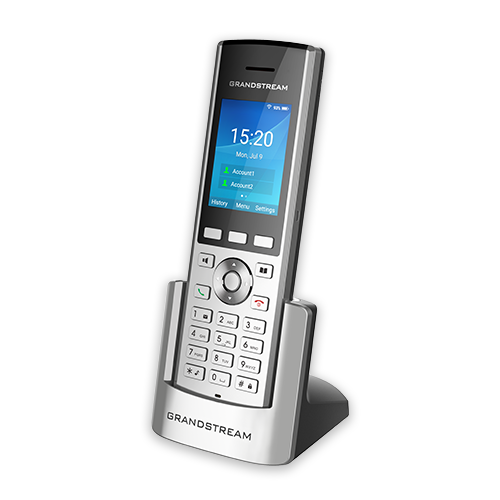
Grandstream WP810
A modern cordless phone that connects directly to your Wi-Fi network. No cable needed — you can move around anywhere in the house.
- Wi-Fi connection (2.4 GHz and 5 GHz)
- High-quality HD audio
- Long-lasting battery (6h talk time)
- Preconfigured, ready to use
Option 2: ATA adapter
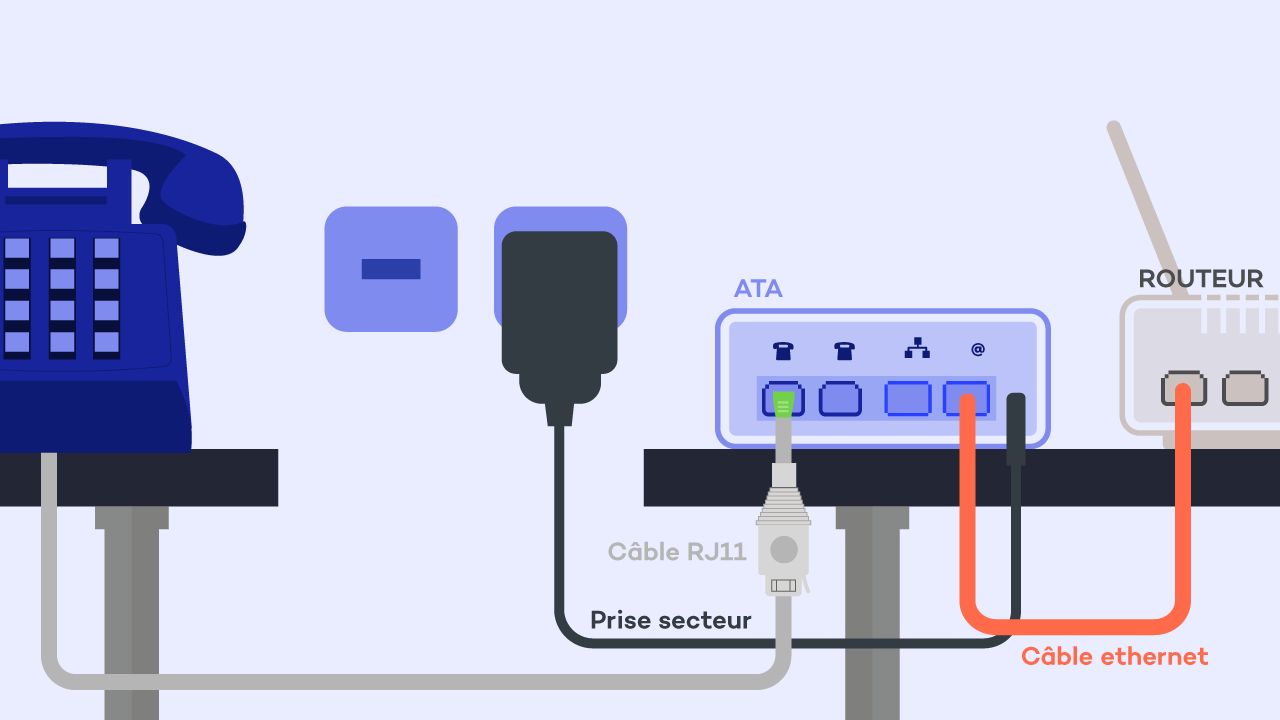
Analog Telephone Adapter (ATA)
Keep your current phone! The ATA adapter plugs into your router and converts the VoIP signal for your traditional analog phone.
- Compatible with any analog phone
- Can power your existing wiring
- Ideal if you already own phones
- Preconfigured, plug and use
Why switch to VoIP phone service?
VoIP offers many advantages over a traditional phone line:
Significant savings
Save 40 to 60% on your monthly bill compared to Bell or Vidéotron. More than $500 in savings per year on average.
Features included
Caller ID, voicemail, call waiting, call forwarding, call blocking... Everything is included at no extra charge.
Unlimited calling
Unlimited calls anywhere in Canada and the United States included in all our plans. No more surprise long-distance charges.
HD audio quality
Modern VoIP uses HD audio codecs that deliver sound quality superior to traditional phone lines.
No contract
No commitment, no contract. You're free to cancel at any time with no fees or penalties.
Number portability
Keep your current phone number! Porting costs $15 and usually takes 5 to 10 business days.
Frequently asked questions about VoIP and Internet compatibility
Does VoIP work during an Internet outage?
How much bandwidth does a VoIP call use?
Can I use VoIP with several phones in the house?
Is 911 service available with VoIP?
Do Netflix or online games affect VoIP quality?
Does VoIP work with an alarm system?
What's the difference between VoIP and IP telephony?
Can I keep my area code if I move?
Glossary of VoIP terms
Here are the technical terms you might come across when talking about VoIP phone service:
VoIP
Voice over Internet Protocol. Technology for transmitting voice over the Internet.
SIP
Session Initiation Protocol. The standard protocol used to establish VoIP calls.
ATA
Analog Telephone Adapter. A box that converts the VoIP signal for a traditional analog phone.
Codec
Audio compression algorithm. The most common are G.711 (high quality) and G.729 (bandwidth saving).
Latency
The delay between sending and receiving sound. Should be under 150ms for a natural conversation.
Jitter
Variation in latency. High jitter causes audio dropouts and distortion.
QoS
Quality of Service. A router feature that prioritizes VoIP traffic over other applications.
Porting
Transferring your existing phone number to a new provider.
Is your connection compatible?
Switch to VoIP and save up to 60% on your phone bill!